
Eliminate Test Data Chaos: Simulate Real Scenarios on Deployed Systems with Live Traffic
By Anand Bagmar
Table of Contents
- API proxy recording for deployed app testing: simulate edge cases without breaking production
- Why deployed app testing is harder than it looks
- A concrete example: prepaid recharge plans
- The core idea: record real API traffic, then replay with mocks
- How Specmatic Live Proxy works (step by step)
- Simulating the “zero plans available” empty state
- From manual testing to automated testing with Playwright
- What you can test with API proxy recording
- FAQ
API proxy recording for deployed app testing: simulate edge cases without breaking production
Testing a deployed application is one of those problems that sounds simple until you actually have to do it. Your system is already live. Developers, QA, and estimators (yes, they test too) are using the front end. Their actions trigger real API calls to your back end, and your application’s UI and behavior depend on whatever responses come back.
So the question becomes: how do you reliably test empty states, pagination edge cases, timeouts, partial outages, and “backend redeployed right now” scenarios, all while the app stays deployed and usable?
This is where API proxy recording becomes a practical strategy. By recording real traffic with a tool like Specmatic and then replaying it with controlled mocks, you can test positive flows and negative flows with confidence, without taking the application down.
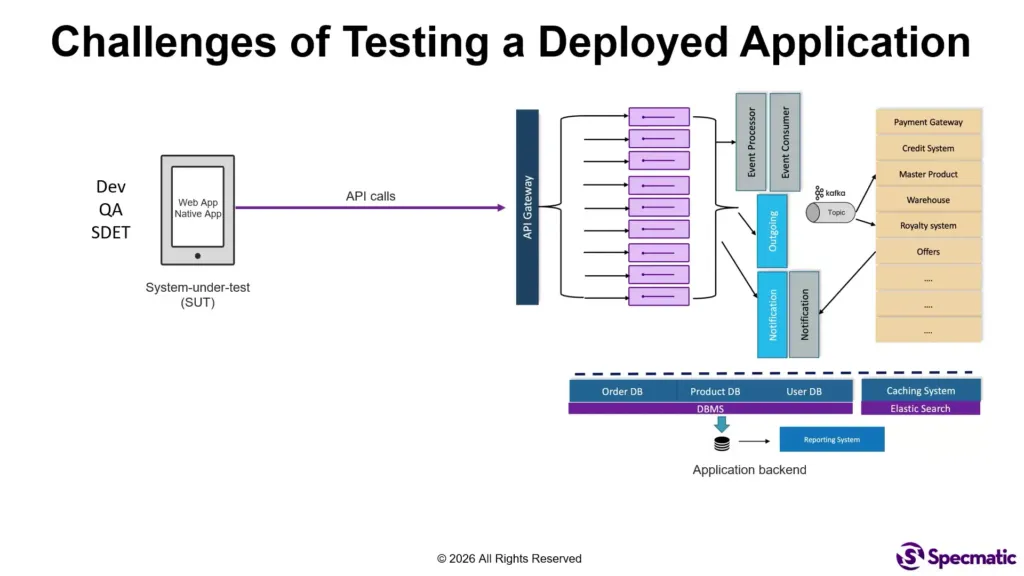
Why deployed app testing is harder than it looks
When apps are in development, test data is easy to manipulate and environments are isolated. In a deployed setup, you lose that comfort. You are testing in a world where:
- Test data creation is constrained. You cannot just invent rare backend responses on demand.
- Negative flows are difficult to reproduce. You can’t easily force an API to timeout or simulate “no plans available” every time someone needs to validate the UI.
- APIs return diverse data that drives UI logic. Getting the exact shape of a response that triggers a specific UI state can be tricky.
- The app is used by many people at once. You need a way to test without impacting colleagues relying on normal functionality.
A concrete example: prepaid recharge plans
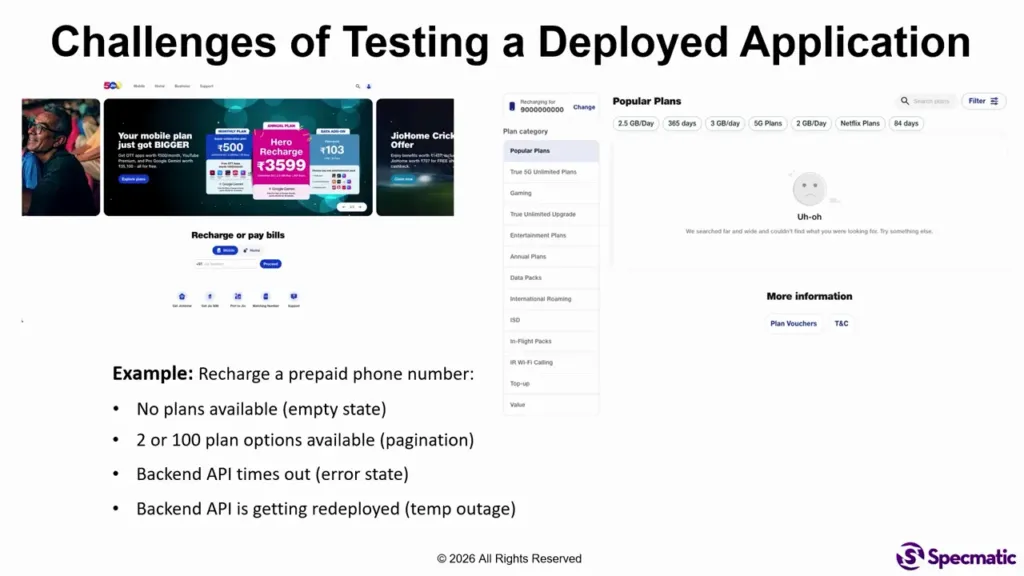
Consider a prepaid recharge feature in a geo.com-like application. If you enter a valid phone number, the UI shows a relevant set of recharge plans.
But testing does not stop at the “happy path.” You likely also need to simulate:
- Empty state: a phone number with zero plans available so the UI displays “no plans found.”
- Pagination edge case: a situation with too many plans, so you validate how pagination behaves.
- Error states: for example, when a back end API times out.
- Temporary outage / partial redeploy: a component of your back end is redeployed, and you want to see how the front end behaves during that disruption.
In deployed reality, forcing each of those conditions manually is painful, inconsistent, and often impossible without destabilizing the environment. That’s the core challenge.
The core idea: record real API traffic, then replay with mocks
The approach uses Specmatic Live Proxy, a mechanism that sits between your deployed front end (web or native apps) and your back end.
Instead of trying to manufacture rare states in production, you do this in a controlled way:
- Capture (record) traffic from the application front end to the back end.
- Generate mocks for the specific operations you want to test (for example, “recharge plans” and “recharge mobility number”).
- Replay requests through the proxy, but return mocked responses for those operations to trigger the exact UI states you care about.
This is the heart of API proxy recording: you leverage real, previously observed interactions to create realistic test scenarios, instead of guessing response shapes.
How Specmatic Live Proxy works (step by step)
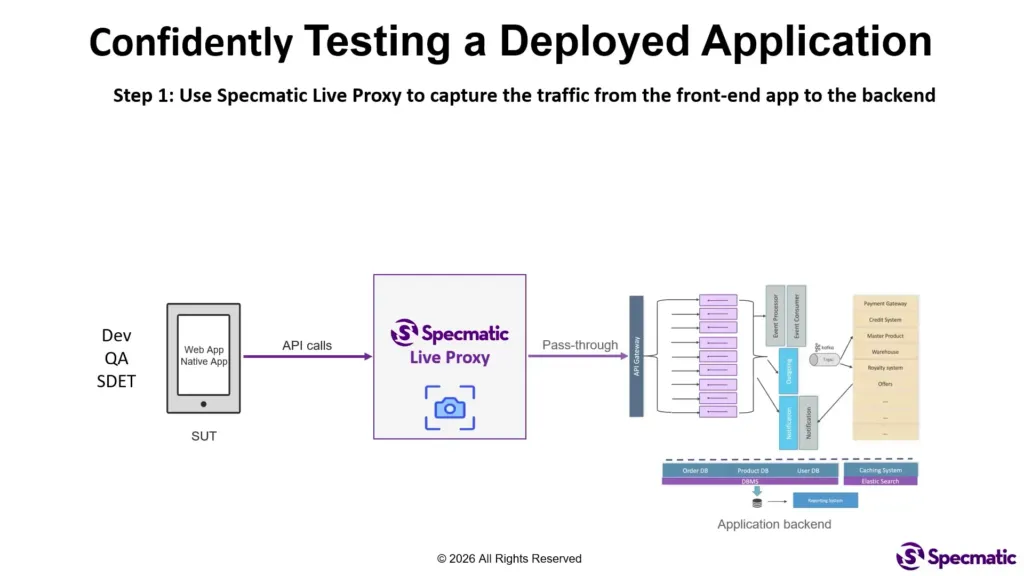
Step 1: Pass-through recording
Start the Specmatic proxy with your target URL. The proxy behaves like a pass-through.
That means:
- Requests still reach your real back end.
- Responses come back to your front end normally.
- Specmatic records the traffic as it flows.
So you are not breaking production behavior during capture. You are simply building a record of what “real” looks like for the interactions you want to test.
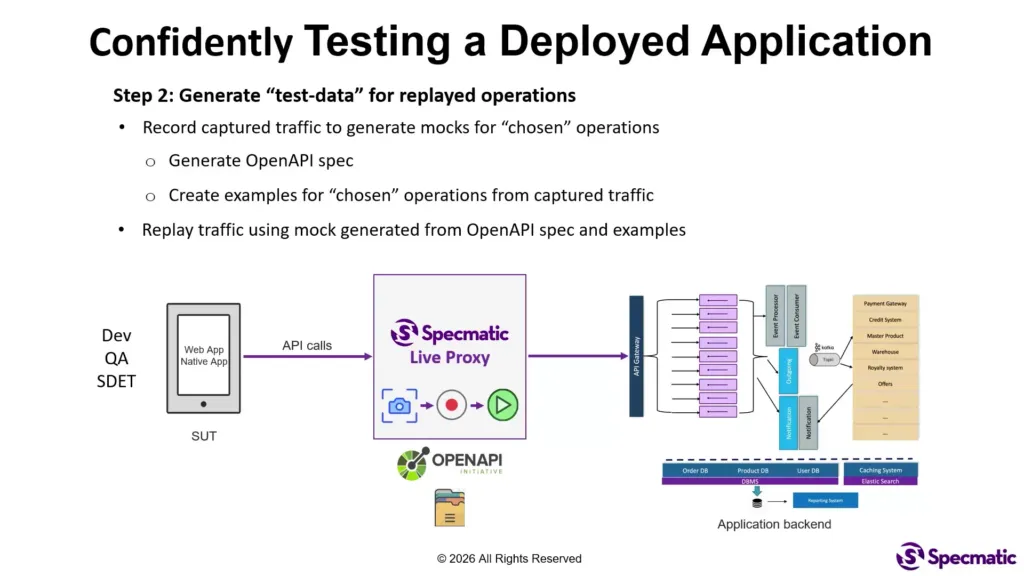
Step 2: Choose operations and generate mocks
Using the captured traffic, you generate mocks for the specific operations relevant to your scenarios. Specmatic will:
- Automatically generate an OpenAPI spec for the selected operations.
- Create concrete examples based on what it observed in recorded traffic.
This matters because your mocks can be tied to real request and response contracts, rather than loosely defined test fixtures.
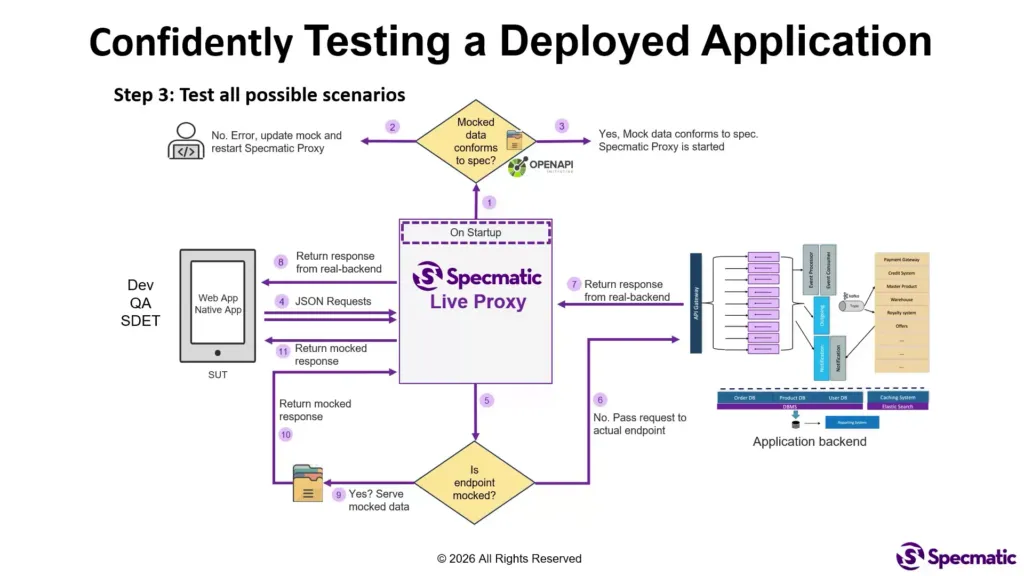
Step 3: Validate mocks before the proxy starts
Before replaying anything, the proxy performs a safety check: it validates whether your mocks conform to the OpenAPI spec.
If there is a mismatch, the proxy will not start. That nudges you into keeping your mocks consistent with the API contract, which reduces “test lies” where the app behaves incorrectly because the test data is malformed.
Step 4: Replay with conditional mocking
Now requests come from your deployed front end to the Specmatic proxy. The proxy checks each request:
- If the operation is not mocked, it passes the request through to the real back end.
- If the operation is mocked, the proxy returns the mocked example instead.
Result: you can test many scenarios end-to-end while keeping the rest of the system behaving normally.
Simulating the “zero plans available” empty state
Here’s what the flow looks like in practice with the prepaid recharge example.
First, you start with a valid phone number so the UI displays multiple plans. During recording, the proxy captures all operations involved in loading the plan options.
Once the mock spec and examples are created, you generate additional examples. For the empty state scenario, you create an example using a phone number that results in zero plans available. Then you update the mock data to remove the plan list entirely.
When you replay through the Specmatic proxy and enter that “zero plans” number, the UI should show the empty state immediately.
The key part: you did this without taking the application down. Your colleagues can keep using the deployed app, and you can still force the UI into states that would be hard to reproduce consistently otherwise.
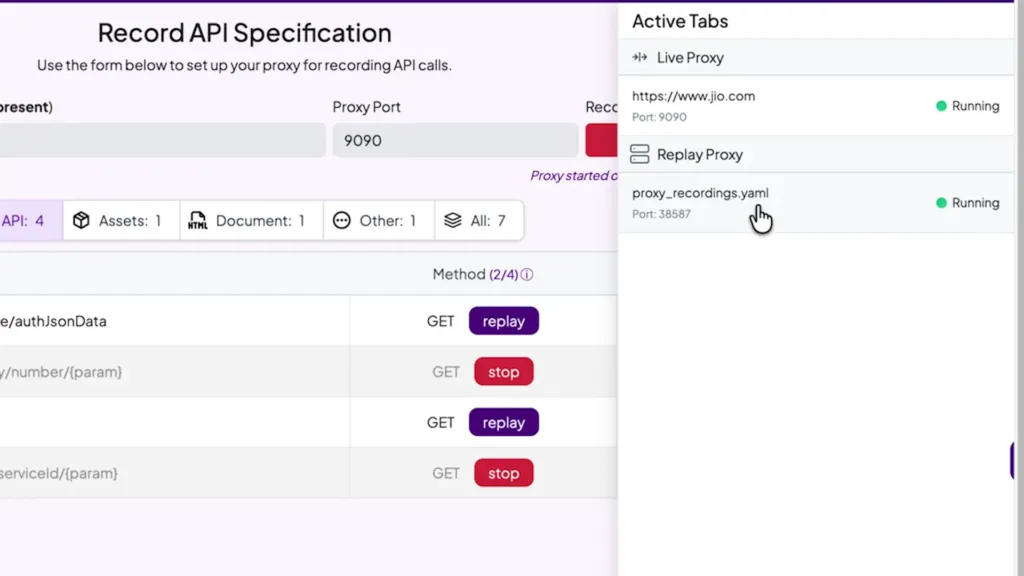
From manual testing to automated testing with Playwright
Manual testing is useful, but real value comes from repeating the scenario reliably. The same recorded and mocked setup can be automated quickly.
In this approach, Playwright can be used to automate the end-to-end flow:
- Start the Specmatic mock server automatically in the background.
- Run the UI scenario for a valid phone number.
- Generate new examples to cover additional cases such as invalid phone numbers or zero plans.
Because the mocks are based on OpenAPI specs and recorded examples, automation becomes less fragile. You are testing behavior against controlled, contract-respecting responses.
What you can test with API proxy recording
This strategy is especially strong for cases where the app behavior depends heavily on response content, timing, or backend availability.
Common categories include:
- Positive flows: ensure the UI works end-to-end with expected data.
- Negative flows: empty lists, missing fields, unexpected shapes (as defined by the contract).
- Pagination and list rendering: verify behavior when result sets are large.
- Error states: simulate API timeouts, downstream errors, and partial failures.
- Temporary outage behavior: validate frontend resilience when a backend component redeploys or becomes temporarily unavailable.
If you have ever struggled to reproduce a rare UI state on demand, this is designed to remove that bottleneck.
FAQ
What is API proxy recording?
API proxy recording is a technique where a proxy captures real API traffic from your front end to your back end, then allows you to replay that interaction later with controlled mocks. This makes it much easier to test edge cases in a deployed app without breaking production behavior.
How does Specmatic help with deployed app testing?
Specmatic Live Proxy records pass-through traffic from your running application, generates an OpenAPI spec and examples for selected operations, validates your mocks against the spec, and then conditionally returns mocked responses during replay. This enables end-to-end testing of positive, negative, and error scenarios while keeping the rest of the system intact.
Can this approach simulate “zero plans available” scenarios?
Yes. You record the operations involved in loading plan options, create or modify mocked examples to represent a phone number with no available plans, and then replay requests through the proxy so the UI displays the correct empty state.
Does mocking require taking the application offline?
No. Because the proxy can pass through any operations you do not mock, you can test selected scenarios without shutting down the application or disrupting everyone using it.
How can these tests be automated?
You can use Playwright to start the Specmatic mock server automatically and then run UI flows. Since mocks are generated from recorded traffic and validated against the OpenAPI spec, automated tests tend to be more stable and contract-aligned.
Related Posts
By Naresh Jain
When Dependencies Timeout, Does Your API Shed Load with 429 Responses?

By Hari Krishnan
WireMock’s Dirty Secret: Ignoring API Specs & Letting Invalid Examples Slip Through
By Naresh Jain
When Downstream Services Lag, Does Your API Gracefully Accept with 202 Responses?

By Hari Krishnan
Visual Workflow Mocking and Testing with Specmatic and Arazzo API Specifications
By Joel Rosario
Redis Stubbing with Specmatic Contract Testing
By John
Contract vs. Approval Testing: Identifying Bugs in RESTfulBooker’s API with Specmatic and TextTest
By Naresh Jain
gRPC Flaws – The Illusion of Safety & Frustrating DevEx in Proto3’s Type-Safe Contracts
By Jaydeep Kulkarni
JMS Mocking with AsyncAPI using Specmatic

By Yogesh Nikam
Contract Testing Google Pub/Sub: Using AsyncAPI specs as Executable Contracts
By Yogesh Nikam